The persistent issue of melted power connectors on high-end graphics cards has seemingly kicked off the new year. A PC gamer has taken to online forums to report that their NVIDIA GeForce RTX 5090 suffered a failure, with the card’s updated 12V-2×6 power connector showing signs of melting and emitting a burning plastic smell.
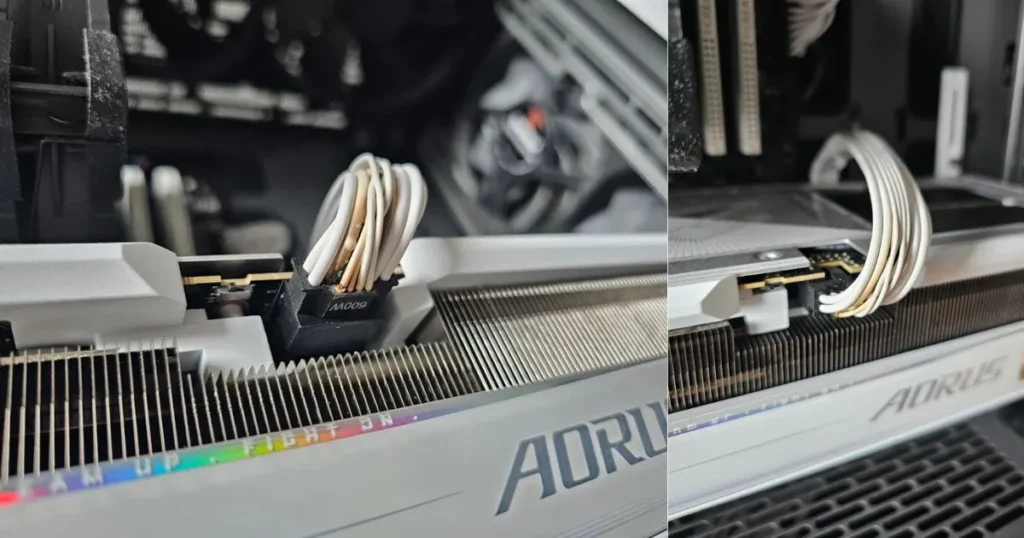
This early 2026 incident is notable because it involves the newer 12V-2×6 standard, a revision designed specifically to prevent the melting issues that plagued its predecessor, the 12VHPWR connector, on some RTX 40-series cards.
The Incident: A Familiar Smell After Gaming
According to the user’s report, the failure occurred after a relatively short gaming session. They had been playing Baldur’s Gate 3 for approximately three hours when they noticed the distinct odor of burnt plastic. Upon inspection, they found visible damage to the 12V-2×6 connector where it plugs into the flagship RTX 5090 graphics card.
The user’s claim that these high-end cards “are still melting” has ignited fresh discussion in the PC hardware community. While this is a single, anecdotal report and not evidence of a widespread defect, it precisely mirrors the failure mode that has concerned enthusiasts for over two years, suggesting that fundamental challenges of delivering immense power through compact connectors remain.
Context: The 12V-2×6 Connector Was Meant to Be the Solution
This report is particularly concerning because it implicates the updated 12V-2×6 connector. This newer standard was engineered with longer sense pins and a refined socket design to ensure a secure, full insertion before power is delivered—the primary fix identified for the earlier 12VHPWR issues.
The incident immediately shifted discussion to installation practices. A common theme in these failures is cable management, specifically a sharp bend in the cable too close to the connector head. For both the old and new standards, manufacturers like Corsair and Seasonic typically recommend maintaining a minimum clearance of 35 mm (about 1.4 inches) before the cable is bent after it is plugged in.
Also, Read
- Intel’s Core Ultra 7 270K Plus 24-Core Refresh CPU Leaks Ahead of Launch, Shows Modest Gains
- ZOTAC Denies Warranty for RTX 5070 Ti Over Fan Issue, Citing PCB Scratches and “Limited Tools”
- AMD Radeon GPU Prices Set to Rise – $20 Increase for 8GB Cards, $40 for 16GB Models
Practical Advice for High-Power RTX 5090 GPU Owners
For owners of any high-wattage GPU using these modern connectors, this report serves as a critical reminder. The core safety guidance remains unchanged but essential:
- Seat it Fully: Ensure the connector is inserted completely into the GPU socket until it clicks and no gap is visible.
- Mind the Bend: Route the cable gently. Avoid forcing it into a tight, immediate bend right at the plug. Use the recommended 35mm of straight cable out of the connector.
- Perform a Check: After your first few intense gaming sessions, power down and safely visually inspect the connection for any signs of overheating, such as discoloration or melting.
The community will now watch to see if the user successfully obtains a repair (RMA) from the board partner and whether further details about their specific power supply, cable, and case setup reveal a contributing factor. For now, it underscores that as GPU power demands push past 400 watts, meticulous installation is not just a recommendation—it’s a necessity for system safety.
Source: Reddit