A Disturbing Escalation: From Melting to Flames
The persistent issues surrounding the 16-pin power connectors used on high-end graphics cards have taken a more alarming turn. A Reddit user has reported that the 12V-2×6 power cable connected to their GeForce RTX 5090 didn’t just melt or degrade—it caught fire. The incident occurred after approximately nine months of normal use, moving the problem beyond gradual failure into the realm of immediate safety hazard.
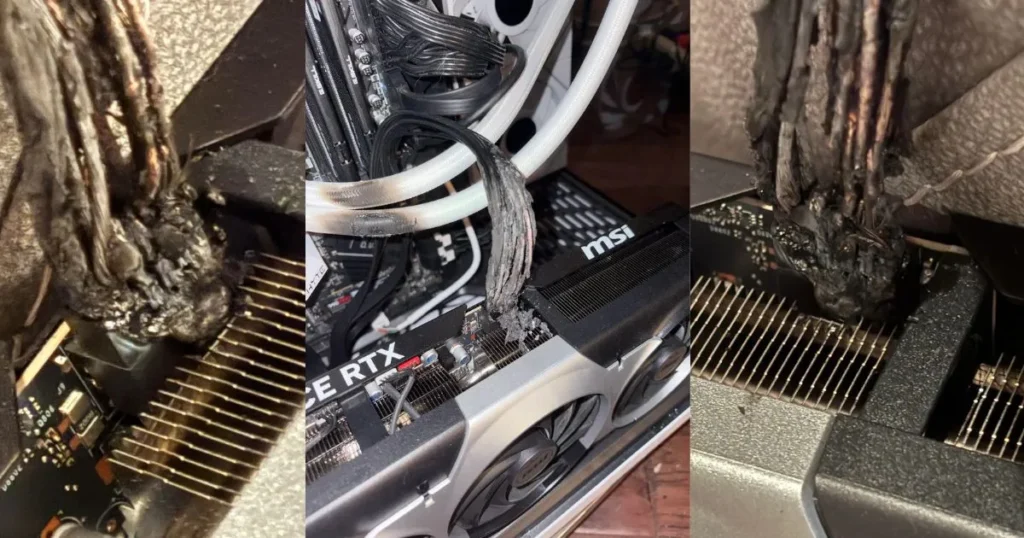
According to the user, they first noticed a strange smell before seeing active flames at the connector area. The cable was the native 12V-2×6 lead that came bundled with their PowerSpec “PS 1050 GFM” ATX 3.1 power supply and had only ever been used with this single GPU. This report represents a significant escalation from the more commonly reported issues of melted plastic and blackened pins.
The Longstanding Context of Connector Problems
This fire incident is the latest and most severe in a long history of fitment and heat-related issues with the 12VHPWR and its updated 12V-2×6 successor. These connectors, designed to deliver massive power to flagship GPUs, have been plagued by instances of improper seating, uneven power distribution, and thermal degradation across both NVIDIA’s RTX 40 and 50 series, as well as some high-end AMD Radeon models.
While the exact cause of this specific fire is unknown and the PSU model details are unverified, the incident underscores the inherent risks when pushing extremely high electrical current through a compact, complex connector.
Critical Safety Steps for High-Power GPU Owners
If you are using a graphics card with a 16-pin power connector, this incident serves as a critical warning. Treat any of the following signs as an immediate stop-use signal:
- Unusual Smells: Any scent of burning plastic or electronics near the GPU connector.
- Visible Damage: Discoloration, warping, or melting on the connector or cable housing.
- Excessive Heat: Noticeable warmth emanating from the connection point during or after use.
- System Instability: Unexplained black screens, crashes, or artifacts under load.
If you observe any of these warnings:
- Power down and unplug your PC immediately.
- Inspect both the GPU and PSU-side connectors carefully.
- Do not continue to test or use the components.
- Contact both your graphics card and power supply manufacturers to initiate an RMA process.
Also, Read
- AMD’s Ultimate Gaming CPU Leaks: Ryzen 9 9950X3D2 with Massive 192MB Cache
- ASUS Defends $4,000 ROG Matrix RTX 5090 GPU Design, Says Misaligned Power Port is “Intentional”
- Amazon Shipping Error Delivers $6,000 Worth of Samsung 9100 PRO SSDs in Surprise Windfall
To minimize risk, always ensure the connector is fully inserted and flush, avoid sharp bends right at the plug, and use the direct power supply cable instead of adapters whenever possible. Vigilance is the best defense for protecting your expensive hardware and, more importantly, your safety.
Source: Reddit