A Deceptive Upgrade That Didn’t Fit
In a troubling new trend for PC builders, scammers are now selling counterfeit Corsair DDR5 RAM that is actually much older, slower DDR4 hardware in disguise. A Reddit user recently shared their experience after purchasing what was advertised as a kit of Corsair Vengeance DDR5 RAM, only to discover a sophisticated deception upon opening the package.
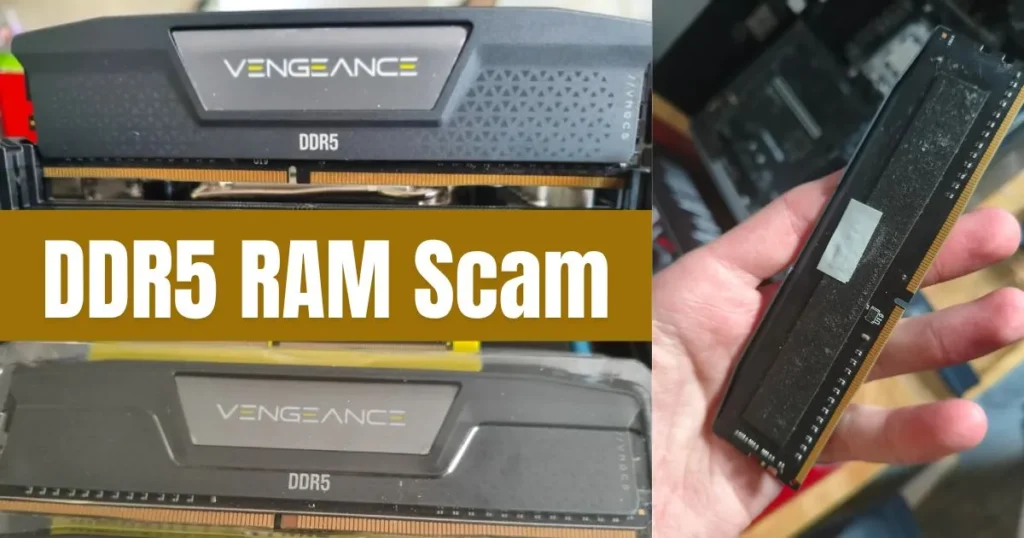
The buyer, known online as “Leading-Growth-8361,” noticed something was wrong immediately. The heatspreader—the metal cover on the memory stick—was loose. More crucially, the module simply would not seat properly in the motherboard’s DDR5 slot. This prompted them to open the heatspreader, where they found the truth: a standard DDR4 memory module hidden inside a shell made to look like modern DDR5.
How to Spot the Fake: The Notch Test
This scam is particularly dangerous because forcing an incompatible memory module can damage both the RAM and the motherboard’s delicate slot. Fortunately, there is one foolproof, physical way to check before installation.
Every memory generation has a different notch position on the row of gold contacts. The notch on a DDR5 module is in a slightly different location compared to DDR4. If you are holding a “DDR5” stick and the notch doesn’t align with the key in your motherboard’s DDR5 slot, it is a major red flag. Do not force it; investigate further.
Other clues include subtle differences in the printed circuit board (PCB) layout, but these can be harder to spot with the heatspreader attached. The notch position is the most immediate and reliable giveaway.
RAM Price Right Now
Present DDR5 RAM price on AMAZON
Protect Yourself: Verify and Buy from Trusted Sources
To avoid falling victim to this scam, experts and experienced builders recommend a multi-step approach:
- Purchase from Authorized Sellers: Whenever possible, buy components from official retailers or well-established, authorized partners.
- Perform the Physical Check: Always visually inspect the notch on the memory contacts before attempting installation.
- Verify with Software: Once your system is running, use trusted tools like CPU-Z or HWiNFO to read the memory’s SPD data. This will report the module’s true type (DDR4 or DDR5), speed, capacity, and manufacturer. If anything doesn’t match your purchase receipt, you likely have a counterfeit product.
Also, Read
- Gamers Demand AMD Bring Back the Ryzen 7 5800X3D as DDR5 Prices Soar
- DDR5 Memory Prices Triple, Making Older PC Platforms a Smarter Upgrade
- DDR5 Memory Kits Now Cost More Than a Flagship NVIDIA GPU
The good news from this specific case is that the buyer was protected. Amazon accepted the return for a full refund. As memory prices continue to fluctuate, staying vigilant is the best defense against those looking to profit from deception.
Source: Reddit, Uniko Hardware